TF1
class description - source file - inheritance tree
public:
TF1 TF1(char* name, char* formula, Float_t xmin = 0, Float_t xmax = 1)
TF1 TF1(char* name, void* fcn, Float_t xmin = 0, Float_t xmax = 1, Int_t npar = 0)
TF1 TF1(char* name, Double_t (*)(Double_t*, Double_t*) fcn, Float_t xmin = 0, Float_t xmax = 1, Int_t npar = 0)
TF1 TF1()
TF1 TF1(TF1& f1)
virtual void ~TF1()
virtual void Browse(TBrowser* b)
TClass* Class()
virtual void Copy(TObject& f1)
virtual Double_t Derivative(Double_t x, Double_t* params = 0, Float_t epsilon = 0)
virtual Int_t DistancetoPrimitive(Int_t px, Int_t py)
virtual void Draw(Option_t* option)
virtual void DrawCopy(Option_t* option)
virtual void DrawF1(char* formula, Float_t xmin, Float_t xmax, Option_t* option)
virtual void DrawPanel()
virtual Double_t Eval(Double_t x, Double_t y = 0, Double_t z = 0)
virtual Double_t EvalPar(Double_t* x, Double_t* params = 0)
virtual void ExecuteEvent(Int_t event, Int_t px, Int_t py)
Double_t GetChisquare()
TH1F* GetHistogram()
TMethodCall* GetMethodCall()
Int_t GetNpx()
Int_t GetNumberFitPoints()
TObject* GetParent()
Double_t GetParError(Int_t ipar)
virtual void GetParLimits(Int_t ipar, Double_t& parmin, Double_t& parmax)
virtual Double_t GetRandom()
virtual void GetRange(Float_t& xmin, Float_t& ymin, Float_t& zmin, Float_t& xmax, Float_t& ymax, Float_t& zmax)
virtual void GetRange(Float_t& xmin, Float_t& ymin, Float_t& xmax, Float_t& ymax)
virtual void GetRange(Float_t& xmin, Float_t& xmax)
virtual Double_t GetSave(Double_t* x)
Float_t GetXmax()
Float_t GetXmin()
virtual void InitArgs(Double_t* x, Double_t* params)
virtual Double_t Integral(Float_t a, Float_t b, Double_t* params = 0, Float_t epsilon = 0.000001)
virtual TClass* IsA()
virtual Int_t LocateBinary(Double_t value, Double_t* array, Int_t nbins)
virtual void Paint(Option_t* option)
virtual void Print(Option_t* option)
virtual void Save(Float_t xmin, Float_t xmax)
virtual void SavePrimitive(ofstream& out, Option_t* option)
virtual void SetChisquare(Double_t chi2)
virtual void SetMaximum(Float_t maximum = -1111)
virtual void SetMinimum(Float_t minimum = -1111)
virtual void SetNpx(Int_t npx = 100)
virtual void SetNumberFitPoints(Int_t npfits)
virtual void SetParent(TObject* p = 0)
virtual void SetParError(Int_t ipar, Double_t error)
virtual void SetParLimits(Int_t ipar, Double_t parmin, Double_t parmax)
virtual void SetRange(Float_t xmin, Float_t ymin, Float_t zmin, Float_t xmax, Float_t ymax, Float_t zmax)
virtual void SetRange(Float_t xmin, Float_t ymin, Float_t xmax, Float_t ymax)
virtual void SetRange(Float_t xmin, Float_t xmax)
virtual void ShowMembers(TMemberInspector& insp, char* parent)
virtual void Streamer(TBuffer& b)
protected:
Float_t fXmin Lower bounds for the range
Float_t fXmax Upper bounds for the range
Int_t fNpx Number of points used for the graphical representation
Int_t fType (=0 for standard functions, 1 if pointer to function)
Int_t fNpfits Number of points used in the fit
Int_t fNsave Number of points used to fill array fSave
Double_t fChisquare Function fit chisquare
Double_t* fIntegral Integral of function binned on fNpx bins
Double_t* fParErrors Array of errors of the fNpar parameters
Double_t* fParMin Array of lower limits of the fNpar parameters
Double_t* fParMax Array of upper limits of the fNpar parameters
Double_t* fSave Array of fNsave function values
TObject* fParent Parent object hooking this function (if one)
TH1F* fHistogram Pointer to histogram used for visualisation
Float_t fMaximum Maximum value for plotting
Float_t fMinimum Minimum value for plotting
TMethodCall* fMethodCall Pointer to MethodCall in case of interpreted function
Double_t (*)(Double_t*, Double_t*)* fFunction Pointer to function
See also
-
TF2
a TF1 object is a 1-Dim function defined between a lower and upper limit.
The function may be a simple function (see TFormula) or a precompiled
user function.
The function may have associated parameters.
TF1 graphics function is via the TH1/TGraph drawing functions.
The following types of functions can be created:
A- Expression using variable x and no parameters
B- Expression using variable x with parameters
C- A general C function with parameters
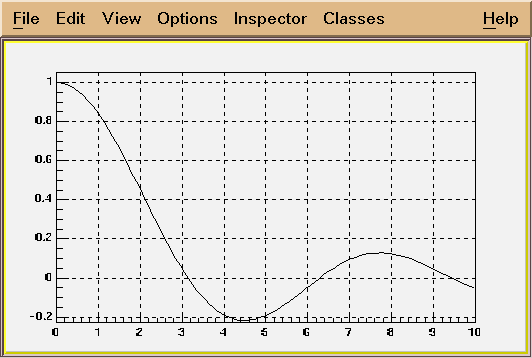
Example of a function of type A
TF1 *f1 = new TF1("f1","sin(x)/x",0,10);
f1->Draw();
/*
 */
Example of a function of type B
TF1 *f1 = new TF1("f1","[0]x*sin([1]*x",-3,3);
This creates a function of variable x with 2 parameters.
The parameters must be initialized via:
f1->SetParameter(0,value_first_parameter);
f1->SetParameter(1,value_second_parameter);
Parameters may be given a name:
f1->SetParName(0,"Constant");
Example of function of type C
Consider the macro myfunc.C below
-------------macro myfunc.C-----------------------------
Double_t myfunction(Double_t *x, Double_t *par)
{
Float_t xx =x[0];
Double_t f = TMath::Abs(par[0]*sin(par[1]*xx)/xx);
return f;
}
void myfunc()
{
TF1 *f1 = new TF1("myfunc",myfunction,0,10,2);
f1->SetParameters(2,1);
f1->SetParNames("constant","coefficient");
f1->Draw();
}
void myfit()
{
TH1F *h1=new TH1F("h1","test",100,0,10);
h1->FillRandom("myfunc",20000);
TF1 *f1=gROOT->GetFunction("myfunc");
f1->SetParameters(800,1);
h1.Fit("myfunc");
}
--------end of macro myfunc.C---------------------------------
In an interactive session you can do:
Root > .L myfunc.C
Root > myfunc();
Root > myfit();
*/
Example of a function of type B
TF1 *f1 = new TF1("f1","[0]x*sin([1]*x",-3,3);
This creates a function of variable x with 2 parameters.
The parameters must be initialized via:
f1->SetParameter(0,value_first_parameter);
f1->SetParameter(1,value_second_parameter);
Parameters may be given a name:
f1->SetParName(0,"Constant");
Example of function of type C
Consider the macro myfunc.C below
-------------macro myfunc.C-----------------------------
Double_t myfunction(Double_t *x, Double_t *par)
{
Float_t xx =x[0];
Double_t f = TMath::Abs(par[0]*sin(par[1]*xx)/xx);
return f;
}
void myfunc()
{
TF1 *f1 = new TF1("myfunc",myfunction,0,10,2);
f1->SetParameters(2,1);
f1->SetParNames("constant","coefficient");
f1->Draw();
}
void myfit()
{
TH1F *h1=new TH1F("h1","test",100,0,10);
h1->FillRandom("myfunc",20000);
TF1 *f1=gROOT->GetFunction("myfunc");
f1->SetParameters(800,1);
h1.Fit("myfunc");
}
--------end of macro myfunc.C---------------------------------
In an interactive session you can do:
Root > .L myfunc.C
Root > myfunc();
Root > myfit();
TF1(): TFormula(), TAttLine(), TAttFill(), TAttMarker()
*-*-*-*-*-*-*-*-*-*-*F1 default constructor*-*-*-*-*-*-*-*-*-*-*-*-*-*-*-*-*
*-*                  ======================
TF1(const char *name,const char *formula, Float_t xmin, Float_t xmax)
:TFormula(name,formula), TAttLine(), TAttFill(), TAttMarker()
*-*-*-*-*-*-*F1 constructor using a formula definition*-*-*-*-*-*-*-*-*-*-*
*-*          =========================================
*-*
*-*  See TFormula constructor for explanation of the formula syntax.
*-*
*-*  Creates a function of type A or B between xmin and xmax
*-*
*-*-*-*-*-*-*-*-*-*-*-*-*-*-*-*-*-*-*-*-*-*-*-*-*-*-*-*-*-*-*-*-*-*-*-*-*-*
TF1(const char *name,void *fcn, Float_t xmin, Float_t xmax, Int_t npar)
:TFormula(), TAttLine(), TAttFill(), TAttMarker()
*-*-*-*-*-*-*F1 constructor using pointer to an interpreted function*-*-*-*
*-*          =======================================================
*-*
*-*  See TFormula constructor for explanation of the formula syntax.
*-*
*-*  Creates a function of type C between xmin and xmax.
*-*  The function is defined with npar parameters
*-*  fcn must be a function of type:
*-*     Double_t fcn(Double_t *x, Double_t *params)
*-*
*-*  This constructor is called for functions of type C by CINT.
*-*
*-*-*-*-*-*-*-*-*-*-*-*-*-*-*-*-*-*-*-*-*-*-*-*-*-*-*-*-*-*-*-*-*-*-*-*-*-*
TF1(const char *name,Double_t (*fcn)(Double_t *, Double_t *), Float_t xmin, Float_t xmax, Int_t npar)
:TFormula(), TAttLine(), TAttFill(), TAttMarker()
*-*-*-*-*-*-*F1 constructor using a pointer to real function*-*-*-*-*-*-*-*
*-*          ===============================================
*-*
*-*   npar is the number of free parameters used by the function
*-*
*-*   This constructor creates a function of type C when invoked
*-*   with the normal C++ compiler.
*-*
*-*-*-*-*-*-*-*-*-*-*-*-*-*-*-*-*-*-*-*-*-*-*-*-*-*-*-*-*-*-*-*-*-*-*-*-*-*
~TF1()
*-*-*-*-*-*-*-*-*-*-*F1 default destructor*-*-*-*-*-*-*-*-*-*-*-*-*-*-*-*-*
*-*                  =====================
TF1(const TF1 &f1)
void Browse(TBrowser *)
void Copy(TObject &obj)
*-*-*-*-*-*-*-*-*-*-*Copy this F1 to a new F1*-*-*-*-*-*-*-*-*-*-*-*-*-*-*-*
*-*                  ========================
Double_t Derivative(Double_t x, Double_t *params, Float_t epsilon)
*-*-*-*-*-*-*-*-*Return derivative of function at point x*-*-*-*-*-*-*-*

    The derivative is computed by computing the value of the function
   at point x-epsilon and point x+epsilon.
   if params is NULL, use the current values of parameters
Int_t DistancetoPrimitive(Int_t px, Int_t py)
*-*-*-*-*-*-*-*-*-*-*Compute distance from point px,py to a function*-*-*-*-*
*-*                  ===============================================
*-*  Compute the closest distance of approach from point px,py to this function.
*-*  The distance is computed in pixels units.
*-*
*-*  Algorithm:
*-*
*-*
*-*-*-*-*-*-*-*-*-*-*-*-*-*-*-*-*-*-*-*-*-*-*-*-*-*-*-*-*-*-*-*-*-*-*-*-*
void Draw(Option_t *option)
*-*-*-*-*-*-*-*-*-*-*Draw this function with its current attributes*-*-*-*-*
*-*                  ==============================================
*-*
*-* Possible option values are:
*-*   "SAME"  superimpose on top of existing picture
*-*   "L"     connect all computed points with a straight line
*-*   "C"     connect all computed points with a smooth curve.
*-*
*-* Note that the default value is "L". Therefore to draw on top
*-* of an existing picture, specify option "LSAME"
*-*
*-* NB. You must use DrawCopy if you want to draw several times the same
*-*     function in the current canvas.
*-*-*-*-*-*-*-*-*-*-*-*-*-*-*-*-*-*-*-*-*-*-*-*-*-*-*-*-*-*-*-*-*-*-*-*-*
void DrawCopy(Option_t *option)
*-*-*-*-*-*-*-*Draw a copy of this function with its current attributes*-*-*
*-*            ========================================================
*-*
*-*  This function MUST be used instead of Draw when you want to draw
*-*  the same function with different parameters settings in the same canvas.
*-*
*-* Possible option values are:
*-*   "SAME"  superimpose on top of existing picture
*-*   "L"     connect all computed points with a straight line
*-*   "C"     connect all computed points with a smooth curve.
*-*
*-* Note that the default value is "L". Therefore to draw on top
*-* of an existing picture, specify option "LSAME"
*-*
*-*-*-*-*-*-*-*-*-*-*-*-*-*-*-*-*-*-*-*-*-*-*-*-*-*-*-*-*-*-*-*-*-*-*-*-*
void DrawF1(const char *formula, Float_t xmin, Float_t xmax, Option_t *option)
*-*-*-*-*-*-*-*-*-*Draw formula between xmin and xmax*-*-*-*-*-*-*-*-*-*-*-*
*-*                ==================================
*-*
void DrawPanel()
*-*-*-*-*-*-*Display a panel with all function drawing options*-*-*-*-*-*
*-*          =================================================
*-*
*-*   See class TDrawPanelHist for example
Double_t Eval(Double_t x, Double_t y, Double_t z)
*-*-*-*-*-*-*-*-*-*-*Evaluate this formula*-*-*-*-*-*-*-*-*-*-*-*-*-*-*-*-*
*-*                  =====================
*-*
*-*   Computes the value of this function (general case for a 3-d function)
*-*   at point x,y,z.
*-*   For a 1-d function give y=0 and z=0
*-*   The current value of variables x,y,z is passed through x, y and z.
*-*   The parameters used will be the ones in the array params if params is given
*-*    otherwise parameters will be taken from the stored data members fParams
*-*
*-*-*-*-*-*-*-*-*-*-*-*-*-*-*-*-*-*-*-*-*-*-*-*-*-*-*-*-*-*-*-*-*-*-*-*-*-*
Double_t EvalPar(Double_t *x, Double_t *params)
*-*-*-*-*-*Evaluate function with given coordinates and parameters*-*-*-*-*-*
*-*        =======================================================
*-*
      Compute the value of this function at point defined by array x
      and current values of parameters in array params.
      If argument params is omitted or equal 0, the internal values
      of parameters (array fParams) will be used instead.
      For a 1-D function only x[0] must be given.
      In case of a multi-dimemsional function, the arrays x must be
      filled with the corresponding number of dimensions.

   WARNING. In case of an interpreted function (fType=2), it is the
   user's responsability to initialize the parameters via InitArgs
   before calling this function.
   InitArgs should be called at least once to specify the addresses
   of the arguments x and params.
   InitArgs should be called everytime these addresses change.
void ExecuteEvent(Int_t event, Int_t px, Int_t py)
*-*-*-*-*-*-*-*-*-*-*Execute action corresponding to one event*-*-*-*
*-*                  =========================================
*-*  This member function is called when a F1 is clicked with the locator
*-*
*-*-*-*-*-*-*-*-*-*-*-*-*-*-*-*-*-*-*-*-*-*-*-*-*-*-*-*-*-*-*-*-*-*-*-*-*
void GetParLimits(Int_t ipar, Double_t &parmin, Double_t &parmax)
*-*-*-*-*-*Return limits for parameter ipar*-*-*-*
*-*        ================================
Double_t GetRandom()
*-*-*-*-*-*Return a random number following this function shape*-*-*-*-*-*-*
*-*        ====================================================
*-*
*-*   The distribution contained in the function fname (TF1) is integrated
*-*   over the channel contents.
*-*   It is normalized to 1.
*-*   Getting one random number implies:
*-*     - Generating a random number between 0 and 1 (say r1)
*-*     - Look in which bin in the normalized integral r1 corresponds to
*-*     - make a linear interpolation in the returned bin
*-*
*-*-*-*-*-*-*-*-*-*-*-*-*-*-*-*-*-*-*-*-*-*-*-*-*-*-*-*-*-**-*-*-*-*-*-*-*
void GetRange(Float_t &xmin, Float_t &xmax)
*-*-*-*-*-*-*-*-*-*-*Return range of a 1-D function*-*-*-*-*-*-*-*-*-*-*-*
*-*                  ==============================
void GetRange(Float_t &xmin, Float_t &ymin, Float_t &xmax, Float_t &ymax)
*-*-*-*-*-*-*-*-*-*-*Return range of a 2-D function*-*-*-*-*-*-*-*-*-*-*-*-*
*-*                  ==============================
void GetRange(Float_t &xmin, Float_t &ymin, Float_t &zmin, Float_t &xmax, Float_t &ymax, Float_t &zmax)
*-*-*-*-*-*-*-*-*-*-*Return range of function*-*-*-*-*-*-*-*-*-*-*-*-*-*-*
*-*                  ========================
Double_t GetSave(Double_t *xx)
Get value corresponding to X in array of fSave values
void InitArgs(Double_t *x, Double_t *params)
*-*-*-*-*-*-*-*-*-*-*Initialize parameters addresses*-*-*-*-*-*-*-*-*-*-*-*
*-*                  ===============================
Double_t Integral(Float_t a, Float_t b, Double_t *params, Float_t epsilon)
*-*-*-*-*-*-*-*-*Return Integral of function between a and b*-*-*-*-*-*-*-*
based on original CERNLIB routine DGAUSS by Sigfried Kolbig
converted to C++ by Rene Brun
/*
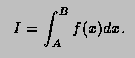
This function computes,
to an attempted specified accuracy, the value of the integral
Usage:
In any arithmetic expression, this function
has the approximate value of the integral I.
- a,b
- End-points of integration interval. Note that B
may be less than A.
- params
- Array of function parameters. If 0, use current parameters.
- epsilon
- Accuracy parameter (see Accuracy).
Method:
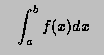
For any interval [a,b] we define  and
and  to be the
8-point and 16-point Gaussian quadrature approximations to
to be the
8-point and 16-point Gaussian quadrature approximations to
and define
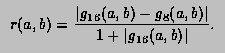
Then,
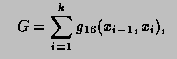
where, starting with  and finishing with
  ,
the subdivision points
,
the subdivision points 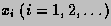 are given by

with  equal to the first member of the sequence
 for which
 .
If, at any stage in the process of subdivision, the ratio
.
If, at any stage in the process of subdivision, the ratio
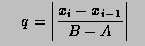
is so small that 1+0.005q is indistinguishable from 1 to
machine accuracy, an error exit occurs with the function value
set equal to zero.
Accuracy:
Unless there is severe cancellation of positive and negative
values of f(x) over the interval [A,B], the argument EPS
may be considered as specifying a bound on the relative error of
I in the case |I|>1, and a bound on the absolute error in
the case |I|<1. More precisely, if k is the number of sub-intervals
contributing to the approximation (see Method), and if
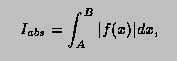
then the relation
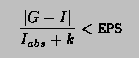
will nearly always be true, provided the routine terminates
without printing an error message. For functions
f having no singularities in the closed interval [A,B]
the accuracy will usually be much higher than this.
Error handling:
The requested accuracy cannot be
obtained (see Method).
The function value is set equal to zero.
Notes:
Values of the function f(x) at the interval end-points
A and B are not required. The subprogram may therefore
be used when these values are undefined.
*/
---------------------------------------------------------------
Int_t LocateBinary(Double_t value, Double_t *array, Int_t nbins)
*-*-*-*-*-*-*Binary search in an array of nbins to locate value*-*-*-*-*-*-*
*-*          ==================================================
*-*  array is supposed  to be sorted prior to this call.
*-*  If match is found, function returns position of element.
*-*  If no match found, function gives nearest element smaller than value.
*-*-*-*-*-*-*-*-*-*-*-*-*-*-*-*-*-*-*-*-*-*-*-*-*-*-*-*-*-*-*-*-*-*-*-*-*
void Paint(Option_t *option)
*-*-*-*-*-*-*-*-*-*-*Paint this function with its current attributes*-*-*-*-*
*-*                  ===============================================
void Print(Option_t *option)
*-*-*-*-*-*-*-*-*-*-*Dump this function with its attributes*-*-*-*-*-*-*-*-*-*
*-*                  ==================================
void Save(Float_t xmin, Float_t xmax)
Save values of function in array fSave
void SavePrimitive(ofstream &out, Option_t *option)
Save primitive as a C++ statement(s) on output stream out
void SetNpx(Int_t npx)
*-*-*-*-*-*-*-*Set the number of points used to draw the function*-*-*-*-*-*
*-*            ==================================================
void SetParLimits(Int_t ipar, Double_t parmin, Double_t parmax)
*-*-*-*-*-*Set limits for parameter ipar*-*-*-*
*-*        =============================
     The specified limits will be used in a fit operation
     when the option "B" is specified (Bounds).
void SetRange(Float_t xmin, Float_t xmax)
*-*-*-*-*-*Initialize the upper and lower bounds to draw the function*-*-*-*
*-*        ==========================================================
     The function range is also used in an histogram fit operation
     when the option "R" is specified.
void Streamer(TBuffer &b)
*-*-*-*-*-*-*-*-*Stream a class object*-*-*-*-*-*-*-*-*-*-*-*-*-*-*-*
*-*              =========================================
Inline Functions
            Double_t GetChisquare()
               TH1F* GetHistogram()
               Int_t GetNpx()
        TMethodCall* GetMethodCall()
               Int_t GetNumberFitPoints()
            TObject* GetParent()
            Double_t GetParError(Int_t ipar)
             Float_t GetXmin()
             Float_t GetXmax()
                void SetChisquare(Double_t chi2)
                void SetMaximum(Float_t maximum = -1111)
                void SetMinimum(Float_t minimum = -1111)
                void SetNumberFitPoints(Int_t npfits)
                void SetParError(Int_t ipar, Double_t error)
                void SetParent(TObject* p = 0)
                void SetRange(Float_t xmin, Float_t ymin, Float_t xmax, Float_t ymax)
                void SetRange(Float_t xmin, Float_t ymin, Float_t zmin, Float_t xmax, Float_t ymax, Float_t zmax)
             TClass* Class()
             TClass* IsA()
                void ShowMembers(TMemberInspector& insp, char* parent)
Author: Rene Brun 18/08/95
Last update: 2.00/11 18/08/98 15.31.03 by Rene Brun
Copyright (c) 1995-1998, The ROOT System, All rights reserved. *
ROOT page - Class index - Top of the page
This page has been automatically generated. If you have any comments or suggestions about the page layout send a mail to ROOT support, or contact the developers with any questions or problems regarding ROOT.